Direct Media or JSON Object Data Formatters
Formatters that process media files or JSON object data directly for display outputs.
- Strawberry Field Audio Formatter
- Strawberry Field Simple Citation Formatter
- Strawberry Field Map Formatter using the Leaflet and GeoJson*
- Strawberry Field Formatter for Custom Metadata Templates
- Strawberry Field Video Formatter
- Strawberry Warc Formatter using replay.web embedded player
- Strawberry Default Formatter
- Strawberry Field Pretty Formatter
Recommended prerequisite documentation
Please also see our 'Primer on Display Modes' and 'Strawberryfield Formatters' guides for more information about Display Modes and Formatters.
Strawberry Field Audio Formatter
See Customizable A/V Formatters Configuration documentation here
Strawberry Field Simple Citation Formatter
This Strawberry Field Simple Citation Formatter can be used to display citation information for your Archipelago Digital Objects by making use of an integration with BibCite --and corresponding Metadata Display (Twig) templates.
There is not an example use of this formatter in default Archipelago deployments, and this integration may be sunset in future releases in favor of utilizing Archipelago-native Twig templates only.
You can find the option for this formatter listed in the Formatters dropdown list for any pre-configured display mode + formatter setup.
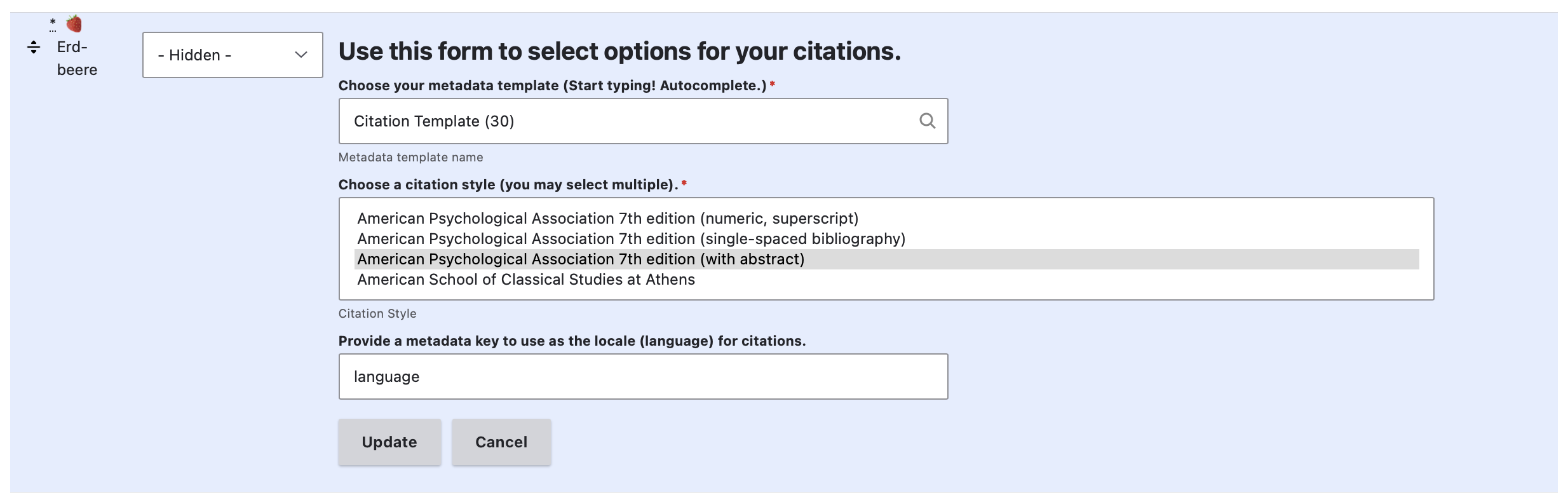
For this formatter, you will have the option to specify a metadata display template to use, select one or multiple citation styles, and provide a metadata key to use as the locale (language) for citations.
Strawberry Field Map Formatter using the Leaflet and GeoJson*
This formatter displays a map using the Leaflet and GeoJSON sources.
In default Archipelago deployments, an example of this formatter can be found within the settings for the Geographic Location Block Solr View.
- /admin/structure/views/view/geographic_location_block_solr
- Through the Manage menu > Structure > Views > Geographic Location Block Solr
To review the default settings configured for this formatter, click on "Content datasource: ..." in the 'Fields' section of the Geographic Location Block Solr` View configuration form.
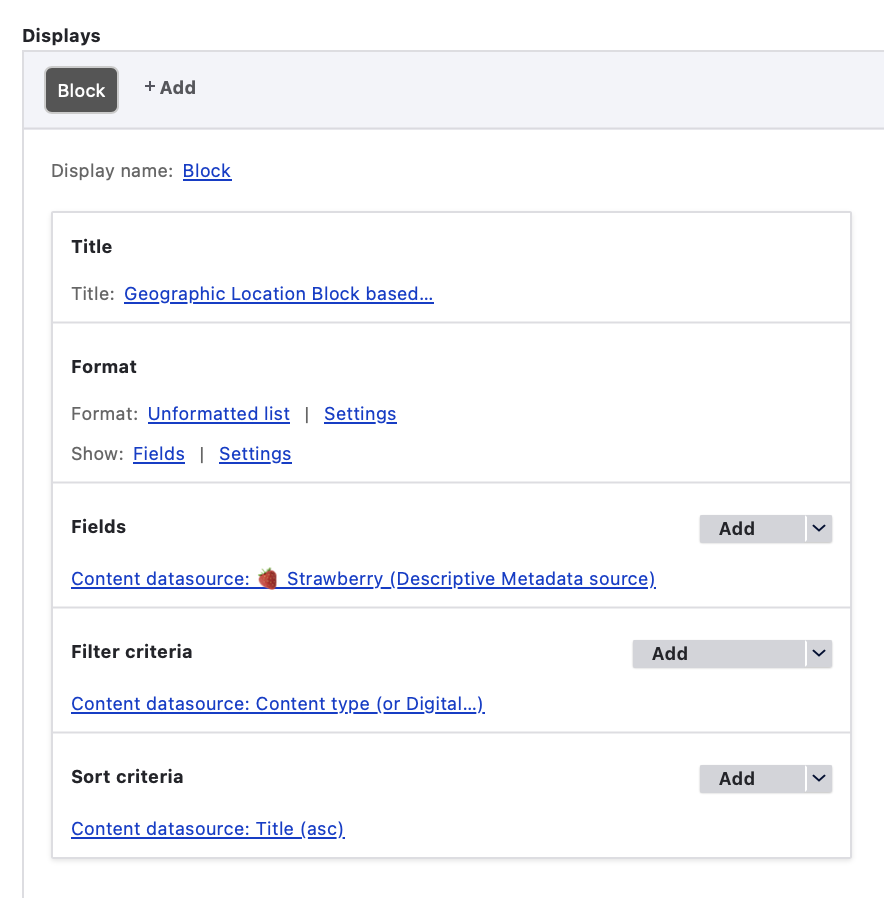
Under 'Render settings', you can review the default configurations for this View's usage of the Strawberry Field Map Formatter using the Leaflet and GeoJson.
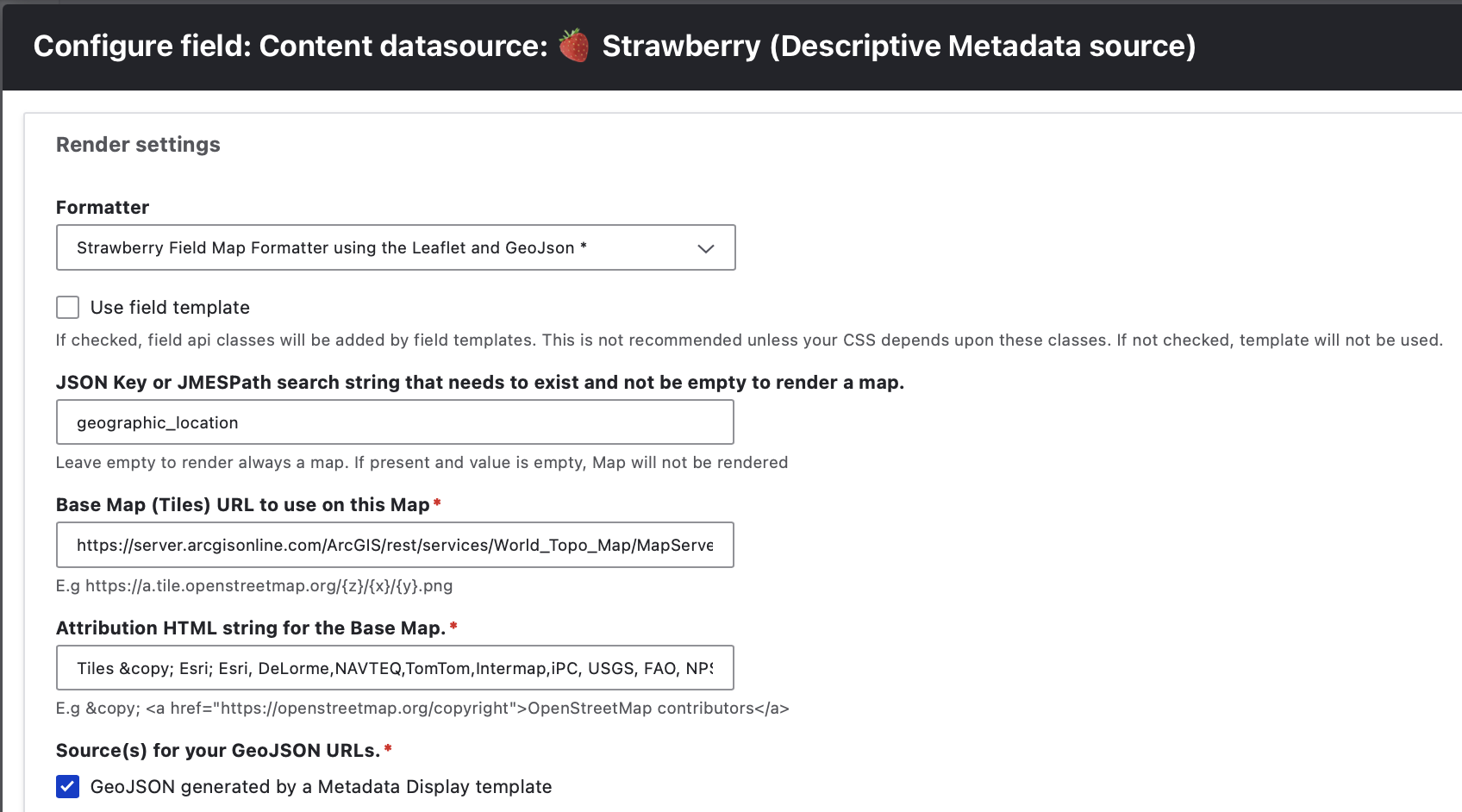
Default configurations used
- JSON Key or JMESPath search string that needs to exist and not be empty to render a map: 'geographic_location'
- Base Map (Tiles) URL to use on this Map: 'https://server.arcgisonline.com/ArcGIS/rest/services/World_Topo_Map/MapServer/tile/{z}/{y}/{x}'
- Attribution HTML string for the Base Map: 'Tiles © Esri; Esri, DeLorme,NAVTEQ,TomTom,Intermap,iPC, USGS, FAO, NPS, NRCAN, GeoBase, Kadaster NL'
- Source(s) for your GeoJSON URLs: checked box for 'GeoJSON generated by a Metadata Display template'
- No checked options for the 'Optional: Source(s) for IIIF Manifest that will provide Georeferenced W3C Annotations for Overlays'
- Select which Source will be handled as the primary one: set to 'metadataexposeentity'
- No selection for 'Select which Overlay IIIF Source will be handled as the primary one'
- Select which Exposed Metadata Endpoint will generate the GeoJSON: 'GeoJSON'
- Max width is set to 0 to force 100% width; Max height is set to 480 pixels.
- Initial zoom is set to 15; minimum zoom is set to 2; max zoom is set to 20.
- Custom base URL info is set to reflect the Archipelago Deployment image server setup as needed.
- Option is checked to 'Hide the Viewer in the presence of an Embargo'
- All other optional settings are left empty/not configured.
Strawberry Field Formatter for Custom Metadata Templates
This formatter casts your plain Strawberry Field JSON into other metadata formats using configurable templates, such as casting Archipelago Digital Object JSON data into formatted HTML through the Object Description twig template.
You can find an example of this formatter being used in almost every provided default view mode. One example can be found in the Digital Object Full View settings configuration form at:
- admin/structure/types/manage/digital_object/display/digital_object_viewmode_fullitem
- Through the Manage menu > Structure > Content types > Digital Object > Manage display > Select 'Digital Object Full View'
Click on the small settings cogwheel on the right hand side of the 'Strawberry Field Formatter for Custom Metadata Templates' formatter to review the formatter settings.
You will most often see the "Object Description" metadata display template listed for the metadata template, with the option to "Use Global IIIF Urls" checked.
Please see our full documentation related to Twig Templates and Archipelago, here.
Strawberry Field Video Formatter
See Customizable A/V Formatters Configuration documentation here.
Strawberry Warc Formatter using replay.web embedded player
This formatter integrates with Webrecorder's ReplayWeb browser-based web archive viewer.
You can find the default Warc Formatter settings configuration form at:
- admin/structure/types/manage/digital_object/display/digital_object_with_replay_web_webarchive_with_navbars_
- Through the Manage menu > Structure > Content types > Digital Object > Manage display > Select 'Digital Object with WARC Replay.web Widget'
Select the small settings cogwheel to the right of the Erdbeere field + Strawberry Warc Formatter using replay.web embedded player to review the custom WARC formatter settings.
Default configurations used
- Use IIIF Global Urls? Yes.
- IIIF Media Server base URI: https://dcmny.org/cantaloupe/iiif/2
- IIIF Media Server Internal base URI: http://esmero-cantaloupe:8182/iiif/2
- Limited to the following file upload JSON Keys: Fetch from any available
- Embargo Alternate upload JSON Keys: Do not provide alternate files when embargoed
- Viewer for embargoed Objects is hidden
- Use JMESPath? No.
- No JMESPath expression used
- No Alternative JMESPath expression used
- Fallback to non JMESPath? No.
- WARC file fetched from JSON "as:document" key
- Maximum size: 100% x 960 pixels
Strawberry Default Formatter
This formatter displays JSON data, and is used to display ADO JSON data (for logged in users only, by default) in a section below the main object viewer and description on ADO display pages.
You can find an example of this formatter being used in almost every provided default view mode. One example can be found in the Digital Object Full View settings configuration form at:
- admin/structure/types/manage/digital_object/display/digital_object_viewmode_fullitem
- Through the Manage menu > Structure > Content types > Digital Object > Manage display > Select 'Digital Object Full View'
Click on the small settings cogwheel on the right hand side of the 'Strawberry Default Formatter' formatter to review the formatter settings. The only option you will be able to change is the label "Label to be used on the accordion Drop down" --which defaults to (historically) to "Raw Metadata (JSON)".
Strawberry Field Pretty Formatter
This formatter displays JSON data, similar to the "Strawberry Default Formatter" noted above. There is not an example use of this formatter in default Archipelago deployments, but it would potentially be useful for certain Archipelago environments that have certain types of Theme styling that apply to their administrative interfaces.
Thank you for reading! Please contact us on our Archipelago Commons Google Group with any questions or feedback.
Return to the Archipelago Documentation main page.